Discover how MakaNetu works: real-time alerts, emergency SOS button, and community protection. Intelligent urban safety.
What Is MakaNetu? The App That Makes Your City Safer!
Have you ever felt unsafe walking alone at night? Ever wished you knew if an area was dangerous BEFORE getting there? Ever thought how long it would take for help to arrive in an emergency?
MakaNetu was born to solve these problems.
🎯 What Does MakaNetu Do?
MakaNetu is a community safety platform that connects citizens, transforms scattered information into useful alerts, and makes cities safer through collaboration.
Think of it this way: It's like having thousands of eyes protecting you in the city.
When someone reports an assault, accident, or danger, the entire community in the area receives the alert instantly. You avoid the problem before it happens. Simple. Effective. Powerful.
In Real Numbers:
Portugal:
- 64% of people feel unsafe at night on the streets
- 18 minutes average emergency ambulance response time
- 47% of women change routes due to fear of assault
Angola:
- 45+ minutes ambulance response time in Luanda
- 80% of urban population feels unsafe
- Almost zero public information about crimes and dangers
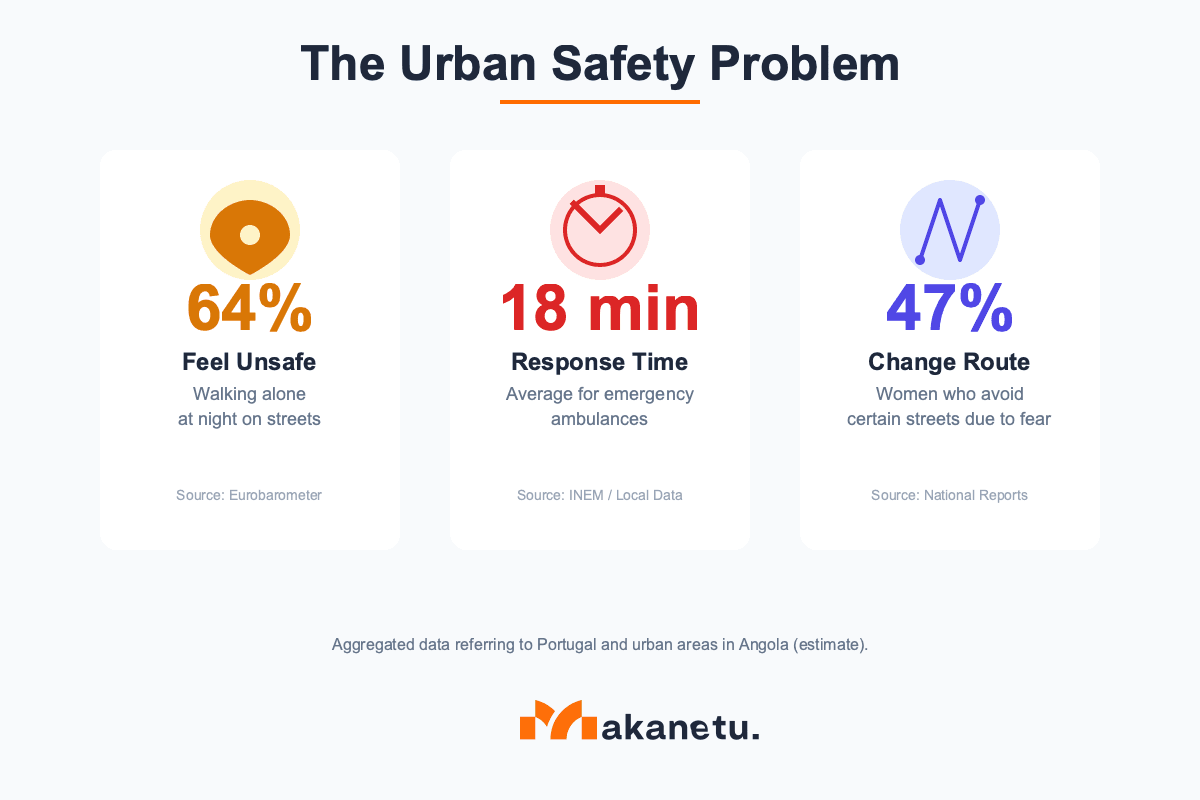
Statistics show the urgency of innovative solutions for urban safety
With MakaNetu, we're changing this.
💡 How Does MakaNetu Work?
MakaNetu works on 3 fundamental pillars:
1️⃣ Validated Real-Time Alerts
The Problem: Today, information about urban dangers is fragmented in WhatsApp groups (40% fake news), unverified social media posts, or police data delayed by 30 days.
The MakaNetu Solution:
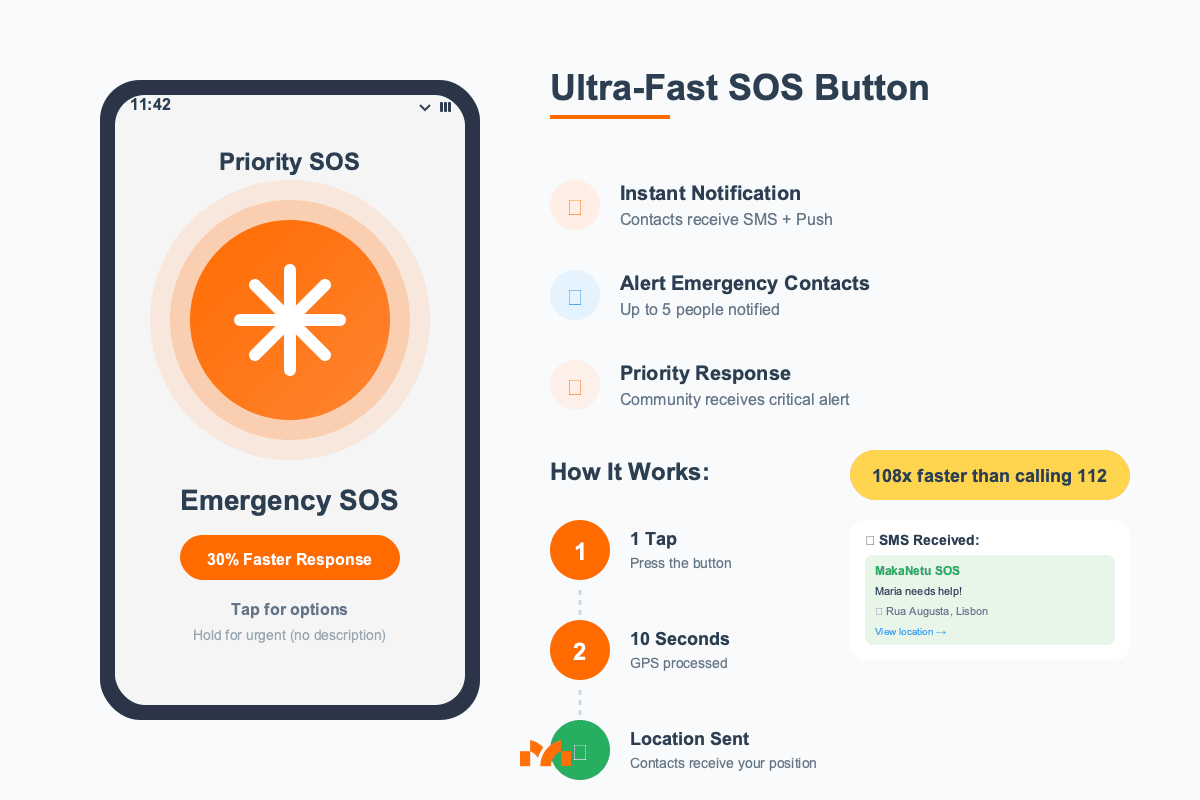
- Someone reports a danger (assault, accident, fire, flood...)
- Artificial Intelligence validates if the alert is credible (85% accuracy)
- Community votes to confirm (reputation system)
- Everyone in the area receives instant notification
- You avoid the problem BEFORE it happens
Real Example:
You're walking at night on Rua Augusta in Lisbon. 10 minutes ago, 3 people reported an assault there.
MakaNetu warns you → You change route (only +2 minutes) → You arrive safely.
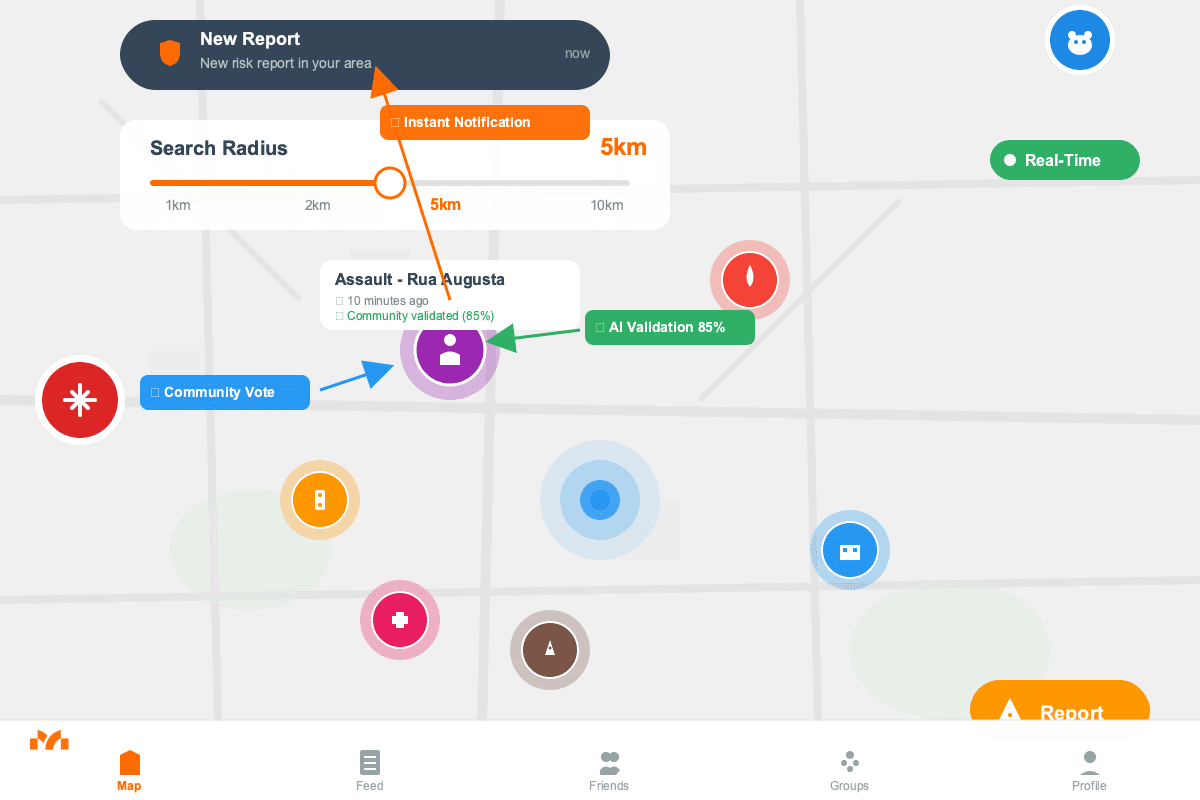
2️⃣ Ultra-Fast Emergency SOS Button
The Problem: In a real emergency, every second counts. Making a 112 call takes an average of 2 minutes (unlock phone, open dialer, call, explain situation, provide location).
In a heart attack, each minute reduces survival by 10%. In a violent assault, 2 minutes can be the difference between life and death.
The MakaNetu Solution:
- Add trusted contacts (family, friends, neighbors)
- In danger? 1 tap on the red 🆘 button
- In less than 10 seconds, they receive:
- 📍 Your exact GPS location
- 📱 Push notification + SMS (even without app installed)
- 🚨 Type of emergency (assault, accident, medical)
- 👤 Medical profile (allergies, blood type - if configured)
Real Example:
Manuel, 72, suffers a fall on an empty street in Porto at 7 AM.
Clicks SOS → Son in Lisbon receives GPS + notification → Contacts Manuel's neighbors → Help arrives in 8 minutes (vs 18 minutes normal ambulance).
Result: Manuel is fine thanks to the 10-second response.
3️⃣ Community That Protects Each Other
The Problem: Traditional safety apps are "me vs danger." You're alone. When something happens, it's already too late.
The MakaNetu Solution: MakaNetu transforms individual safety into a community protection network:
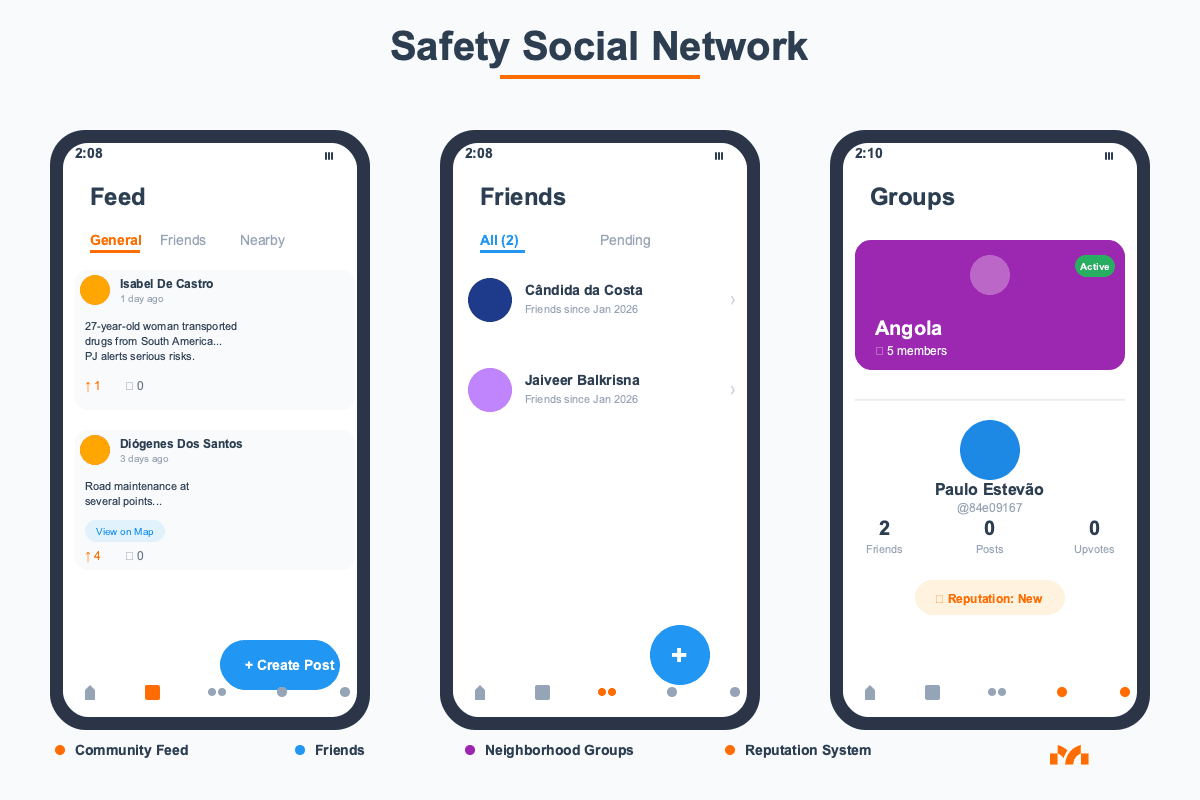
- Add friends and family → See their alerts with priority
- Create/join neighborhood groups → "Alvalade Safety", "Olivais School Moms"
- Community feed → Discuss problems, share solutions (Reddit-style)
- Reputation system → Trusted users have priority alerts
- The more people use it, the more useful it becomes → Exponential network effect
Real Example:
Sofia has 5 friends on the app. All live in Parque das Nações, Lisbon.
When a friend reports an assault near their children's school, Sofia receives priority alert (even being 2km away). Warns husband. They change pickup time.
They avoid dangerous area that day. Community protected each other.
🔥 Clear Benefits (Practical Impact on Your Life)
It's not theory. It's measurable impact on your daily life:
| Benefit | Practical Impact | Comparison |
|---|---|---|
| 🚨 Avoid Dangers Before | You receive alert "3 assaults on this street today" → Change route → Safety | ✅ MakaNetu: Preventive ❌ 112: Reactive (already happened) |
| ⚡ SOS in <10 Seconds | Emergency? 1 tap. Family receives GPS + notification. Help on the way. | ✅ MakaNetu: 10 seconds ❌ 112 call: 2 minutes 108x faster |
| 🗺️ Safer Routes | App suggests path +3min but avoids area with 5 recent crimes | ✅ MakaNetu: Safety first ❌ Google Maps: Time only |
| 👨👩👧 Protect Family | You know where they are. They get automatic help if needed. Peace of mind. | ✅ MakaNetu: Protection network ❌ WhatsApp: Manual, slow |
| 🆓 Free and Simple | Install in 2 minutes. Zero cost. Immediate protection. | ✅ MakaNetu: €0 ❌ Private systems: €40+/month |
| 📱 Works Offline | SOS works even without internet (via SMS) | ✅ MakaNetu: Always functional ❌ Internet-only apps: Fail |
| 🎯 Validated Alerts | AI + community verify. 85% accuracy vs 40% WhatsApp fake news | ✅ MakaNetu: 85% accuracy ❌ WhatsApp: 40% fake news |
Use Cases:
Case 1: The Working Mother
Sofia, 34, Lisbon - Marketing Manager
"I leave the office at 7 PM. I used to use Google Maps which sent me through Street X (fastest). With MakaNetu, I received an alert that there were 3 assaults there this week. I switched to Street Y (+2 min). I arrive home safely, husband at ease. Worth every extra second."
Case 2: The University Student
João, 21, Coimbra - Engineering Student
"I come back from drinks at 2 AM alone. Friends in MakaNetu group receive automatic check-in when I arrive. If I don't arrive in 20 min, SOS activates. I used it once when I got lost drunk. Friend came to pick me up. Parents stopped calling me 5x per night."
Case 3: The Professional Driver
Ricardo, 38, Lisbon - Uber Driver
"I receive 40 rides/day. MakaNetu warns me BEFORE accepting if destination area is dangerous. I refused 3 rides this week to Neighborhood X (4 assaults on drivers). I lost €12, but avoided risk that could cost my life. Worth it."
Case 4: The Independent Elder
Manuel, 72, Porto - Retired
"I live alone, children in Lisbon. I walk 45min/day to the beach. I fell once. Used SOS. Son received location, contacted neighbors. Help arrived in 8 min. Without MakaNetu, I'd be on the ground for hours. Now I have independence WITH safety."
📢 How to Report Incidents on MakaNetu
Reporting is easy, fast, and helps THOUSANDS of people:
Step 1: Open the App
- Tap on "Report" button (orange + icon)
Step 2: Choose Incident Type
We have 11 validated categories:
- 🔪 Assault / Robbery - Person was assaulted or attempt
- 🚗 Traffic Accident - Collision, hit-and-run, blocked road
- 🔥 Fire - Fire in building, car, forest
- 🚑 Medical Emergency - Person needs urgent medical help
- 💧 Flooding - Flooded street, impassable
- ⚡ Electrical Problem - Fallen wires, damaged pole, blackout
- 🏚️ Damaged Infrastructure - Pothole, broken sidewalk
- 🐕 Dangerous Animal - Aggressive dogs, wild animals
- 👥 Suspicious Person - Threatening behavior
- 🚧 Protest / Blockage - Road blocked by protest
- 🆘 Other Danger - Unlisted but dangerous situation
Step 3: Add Details
- Location: Automatic GPS (or adjust manually on map)
- Description: 1-2 short sentences (e.g., "2 armed men assaulted woman, fled on black motorcycle")
- Photos (optional): Add image if safe to do so (DON'T put yourself in danger)
- Urgency level: Low / Medium / High / Critical
Step 4: Publish
- Tap "Send Alert"
- AI validates in 2-5 seconds
- Community in area (500m-5km) receives notification
- Done! You helped hundreds of people.
What Happens Next?
- AI Validation: System analyzes consistency, location, user history
- Community Verification: Other users vote "Confirm" or "False"
- Confidence Score: Alert receives score 0-100% (>70% = reliable)
- Progressive Notification:
- Score >85%: Immediate notification for all
- Score 70-85%: Notification with "Under verification" warning
- Score <70%: Only visible in app, no push notification
- Real-Time Update: If more people confirm, score rises. If deny, drops.
Best Practices When Reporting:
✅ Do:
- Report IMMEDIATELY after witnessing (fresh memory)
- Be specific: "2 men, 1.80m, black jacket, motorcycle without plate"
- Add photo IF safe (of location, never of aggressors directly)
- Confirm others' alerts if you witnessed too
❌ Don't:
- Report rumors without confirming ("I heard that...")
- Put yourself in danger to take photos
- Report old situations (>24h)
- Identify people by name (data protection)
🆘 SOS Button: Saves Lives in 10 Seconds
The SOS is MakaNetu's most powerful feature. In real emergency situations, it can literally save lives.
How to Configure (Once, 3 Minutes):
Step 1: Add Trusted Contacts
- Go to Profile → SOS Contacts
- Add 3-5 trusted people:
- Close family (spouse, parents, adult children)
- Close friends in same city
- Trusted neighbors
- Work colleagues (if applicable)
Step 2: Define Emergency Types
Choose which situations would trigger SOS:
- 🔪 Assault / Violence
- 🚗 Traffic Accident
- 🏥 Medical Emergency
- 🔥 Fire
- 🌊 Flood / Natural Disaster
- 🆘 Other Danger
Privacy Note: This information is ONLY sent in SOS emergency. NEVER shared publicly.
How to Use in Emergency:
Method 1: Red Button (App Open)
- Open MakaNetu app
- TAP on the big red SOS button (center of screen)
- Confirm emergency type (1 tap)
- DONE. Help on the way.
Method 2: Widget (Faster)
- Add MakaNetu widget to home screen
- 1 TAP directly on SOS widget
- Confirm (or wait 5s, activates automatically)
- DONE. Even faster.
Method 3: Voice (Hands-Free)
- "Hey Siri, activate MakaNetu SOS" (iOS)
- "Ok Google, activate MakaNetu SOS" (Android)
What Contacts Receive:
Push Notification (if they have app):
🆘 EMERGENCY - [Your Name]
Type: Violent Assault
Location: Rua Augusta 123, Lisbon
3 seconds ago

[VIEW REAL-TIME LOCATION] [CALL 112] [CONTACT]
SMS (even without app):
🆘 MakaNetu EMERGENCY
[Your Name] activated SOS.
Type: Assault
Location: Rua Augusta 123, Lisbon
GPS: https://maps.google.com/?q=38.7123,-9.1234
Sent: 19/01/2026 22:47
Email (backup): Includes location, map, medical profile, last 30min history (if configured).
Cancel False Alarm:
If you activated SOS by mistake:
- Tap "Cancel SOS" in first 10 seconds
- Contacts receive: "FALSE ALARM - [Your Name] canceled SOS. All good."
Advanced Features:
Automatic Recording
- Audio: Records 30s before and 5min after SOS (evidence)
- Video: Records discreetly (if configured)
- Encrypted storage in cloud (access only you + authorities with your permission)
Real-Time Location Sharing
- SOS contacts see your real-time location for 60 minutes
- Updates every 5 seconds
- Draws route where you moved (case you're taken)
MakaNetu is not a promise. It's reality.
🚀 Start Now (2 Minutes)
Step 1: Download Free
- iOS: App Store
- Android: Google Play
Step 2: Create Account
- Email + password
- Or quick login: Google / Apple
Step 3: Basic Setup (60 seconds)
- Allow location (essential for alerts)
- Add 2-3 SOS contacts
- Enable notifications
- Done! You're protected.
Step 4: Explore (Optional but Recommended)
- See alert map in your area
- Join neighborhood group
- Add friends who also use it
- Report first incident (help community)
❓ Frequently Asked Questions
Does the app track me always?
NO. We only use location when:
- You report incident (once, to place on map)
- You activate SOS (emergency, 60min tracking)
- You see nearby alerts (anonymous, we don't save history)
You can disable location ALWAYS. SOS continues working (sends last known location + SMS).
Is my data sold?
NEVER.
- Full GDPR compliance (Europe)
- Zero data sales to third parties
- End-to-end encryption in SOS
- You can export or delete ALL your data (GDPR right)
Can anyone see where I am?
NO.
- Alerts are anonymous (only shows "Trusted user" + reputation score)
- Real-time location ONLY SOS contacts in emergency
- Friends see your alerts, NOT continuous location (unless you activate manual sharing)
What if someone reports fake news?
AI + community validate. System works like this:
- AI analyzes: Consistency, plausible location, user history
- Community votes: "Confirm" vs "False"
- Dynamic score: 0-100% confidence
- Result: 85% accuracy (2x better than WhatsApp 40%)
Users who repeatedly report fake news:
- Low reputation score
- Future alerts marked "Less reliable"
- Extreme cases: Account suspension
But you can use ANYWHERE. The more users in a city, the more useful it becomes (network effect).
🤝 Join the Community
MakaNetu only works if we're many. Each person makes the city 10x safer for everyone.
How You Can Help:
- Download and use - Simple presence makes network stronger
- Report incidents - Help thousands avoid danger
- Add friends/family - Protect each other
- Join neighborhood groups - Stronger local community
- Share the app - Each friend = more useful network for all
Follow us:
Contact:
- Support: contact@makanetu.com
🎯 Safety Is Community
Google Maps shows you the fastest route. MakaNetu shows you the SAFEST route.
112 responds when it already happened. MakaNetu prevents BEFORE it happens.
WhatsApp spreads rumors. MakaNetu validates facts.
You live alone in a city. MakaNetu gives you thousands of eyes protecting you.
The Choice Is Yours:
❌ Continue not knowing where it's dangerous, hope nothing happens, react when too late.
✅ Be smart, avoid dangers, protect family, have community that cares for you.
📲 Download Now. It's Free. It Can Save You.
Download for iOS | Download for Android
Together, we make cities safer. One person at a time. 🛡️
Read also:
About the Author

MakaNetu Team
The MakaNetu team is dedicated to creating safer communities through technology and innovation.